LED Strip Lights: Control, Setup & Troubleshooting Guide
2025-06-30

How to turn strip lights on off?

How to turn strip lights on off?

LED strips, as an essential element of modern lighting and decoration, have been widely used in residential, commercial, and special scenarios. However, many users often encounter issues with inconvenient operation or malfunctions during use. This article systematically introduces the usage methods of LED strips, from basic operations to advanced techniques, helping readers solve practical problems and enhance their experience. We will first explore the most fundamental switching methods.
1. Methods to Turn On/Off LED Strips
2. Troubleshooting Common On/Off Issues
3. Operating Without a Remote
4. Safety & Maintenance Tips
5. Special Scenarios
6. FAQs

1. Methods to Turn On/Off LED Strips

ADLED lighting
The operation of LED strips may seem simple, but the methods vary depending on the type and installation. Understanding these basics is crucial for proper usage.  

1.1 Traditional Wall Switch Control

For LED strips directly connected to a home circuit, the most common control method is through a wall switch. In this setup, the power supply to the strip depends entirely on the switch's state: flipping it to "On" powers the strip, while "Off" cuts the electricity. This method is intuitive and aligns with conventional lighting habits.  
It's worth noting that wall switch-controlled LED strips typically require professional installation to ensure correct and safe wiring. DIY installers must turn off the power beforehand and confirm secure connections to avoid short circuits or loose contacts. Additionally, frequent switching via a wall switch may cause electrical surges, potentially shortening the strip's lifespan.  

1.2 Remote Control Operation

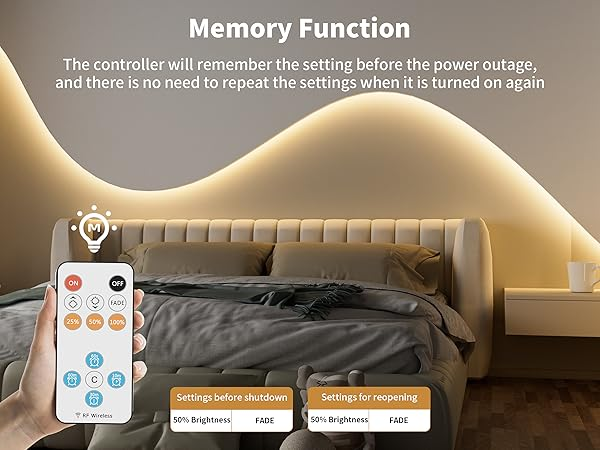
Most mid-to-high-end LED strips come with dedicated remotes, offering more convenience and versatile control. Beyond basic on/off functions, remotes allow brightness adjustment, color changes (for RGB strips), and lighting mode selection.  
Remote controls typically use infrared (IR) or radio frequency (RF) signals. IR remotes require direct alignment with the receiver, while RF remotes are omnidirectional and have a longer range. Ensure the receiver is properly connected and unobstructed. Weak or dead remote batteries may cause signal failure, so regular checks are essential.  

1.3 Smart Control Solutions

With IoT advancements, smart control has become a trend for LED strips. Using Wi-Fi, Bluetooth, or voice assistants (e.g., Amazon Alexa, Google Assistant), users can control strips via smartphone apps or automation scenes.  
Smart setups often require compatible controllers or gateways. Once configured, users gain access to advanced features like remote control, scheduling, and scene modes. For example, a "Welcome Home" mode can auto-activate strips at set times, or geofencing can trigger lights when approaching home. This method significantly enhances convenience and fun.  

1.4 Physical Buttons & Touch Controls

Some LED strips feature physical buttons or touch panels as backup controls. These are typically integrated into the power supply or controller, proving useful when remotes are lost or smart devices fail.  
Touch panels may support multiple functions (on/off, dimming, mode switching) via taps, holds, or combinations. Users should review the manual to avoid operational errors.  

2. Troubleshooting Common On/Off Issues


RGB LED STRIP

 2.1 Strip Won’t Turn On

Power Issues: For low-voltage strips, check the adapter’s output with a multimeter; replace if dead. For high-voltage strips, test the socket with another device.  
Connection Issues: Replug loose connectors. If the strip has broken segments, replace it.  
Control Device Issues: Replace remote batteries or restart smart devices/networks.  

2.2 Strip Won’t Turn Off  

Faulty Switch: Replace short-circuited or stuck wall switches.  
Remote/Smart Module Failure: Try alternate remotes, replace receivers, or reset apps.  

3. Operating Without a Remote


3.1 Smartphone Apps

Use manufacturer or universal LED control apps. For IR strips, consider IR blaster accessories or "universal remote" apps.  

3.2 Manual Power Control

Unplug the adapter or use a switched extension cord. Check controllers for hidden physical buttons.  

3.3 Universal Remotes

Purchase compatible replacements based on the controller’s frequency/encoding (marked on the device).  

3.4 Smart Controller Upgrades

Replace standard controllers with Wi-Fi/Bluetooth versions for app/voice control and automation.  

4. Safety & Maintenance Tips


COLORFUL LED STRIP
Safety: Operate with dry hands; avoid tugging cords; shut off power before repairs.  
Device Care: Turn off physical switches when unused; minimize frequent on/off cycling to prolong lifespan. Use dimmers or soft-start controllers instead.  

5. Special Scenarios


Outdoor Use: Employ waterproof switches/enclosures; inspect for moisture damage.  
Underwater Use: Use submersible-rated switches; power off before maintenance.  
High-Temp Areas: Choose heat-resistant models; ensure proper ventilation.  

6. FAQs


Why does my LED strip flicker after turning it on?

LED strip flickering can be caused by several factors:  
  • Voltage Fluctuations:
 If the power supply voltage is unstable (too high or too low), the LED strip may flicker.  
  Solution: Use a regulated power adapter or install a voltage stabilizer.  
  • Loose or Poor Connections:  
 Flickering often occurs if the strip’s connectors, wires, or solder points are loose.  
 Solution: Check all connections, re-solder weak joints, or replace damaged wires.  
  • Overloaded Power Supply:  
  If the power supply is underpowered for the strip’s length, flickering may occur.  
  Solution: Ensure the power supply matches the strip’s wattage (e.g., a 5-meter 12V strip may need a 60W adapter).  
*LED Driver Failure:  
  A failing driver (transformer) can cause inconsistent power delivery.  
  Solution: Test with a different power supply or replace the driver.  

Why is my LED strip’s brightness uneven or too dim?

Uneven brightness is a common issue with LED strips. Possible causes include:  
Voltage Drop (Long Strips)
Poor-Quality LEDs or Power Supply:  
Partial LED Failure
Incorrect Wiring

Why does my LED strip not turn on even though the power is working?

If the strip remains unresponsive despite having power, check:  
Blown Fuse in the Power Supply
Faulty Controller or Remote  
Damaged LED Strip Circuit
Wrong Input Voltage
  

Why does my LED strip turn on by itself randomly?

Ghost power or auto-activation can be caused by:  
Smart Device Glitches:  
Residual Current in the Circuit
Remote Signal Interference

7. Conclusion


LED strip operation varies by power and control methods. Prioritize safety, follow guidelines, and troubleshoot promptly. Select scenario-appropriate products and maintain them regularly to maximize functionality and longevity. Mastering these practices ensures optimal performance, blending utility and aesthetics seamlessly into daily life.  
CONTACT WITH ADLED