


SP630E LED Controller for LED Strip Lights
AD-APP-SP630E-K
APP LED Controller, DC12V~24V 12V:<144W‚24V:<288w Available(CCT/RGB/RGBW/RGBCCT).
Quantity
Professional Controller for LED Strip Lights
Upgrade your lighting control with our latest controller for LED strip lights. This innovative strip light controller, designed for versatility, is a true all-in-one solution. This advanced LED strip light controller is compatible with virtually every type of color-changing LED strip, including CCT, RGB, RGBW, RGBCCT, and even addressable RGBIC strips. This controller for LED strip lights simplifies your setup, offering a single, powerful device to manage all your color-changing lighting needs. This strip light controller provides a seamless and user-friendly experience, regardless of the LED strip technology you’re using.
APP LED Controller 12~24V
Controller for LED Strip Lights Specifications
Product name | APP LED Controller |
Model | AD-S100-K1-G5 |
Supply voltage | AD-APP-SP630E-K |
Supply power | 12V:<144W‚ 24V:<288W |
Connect mode | Common anode |
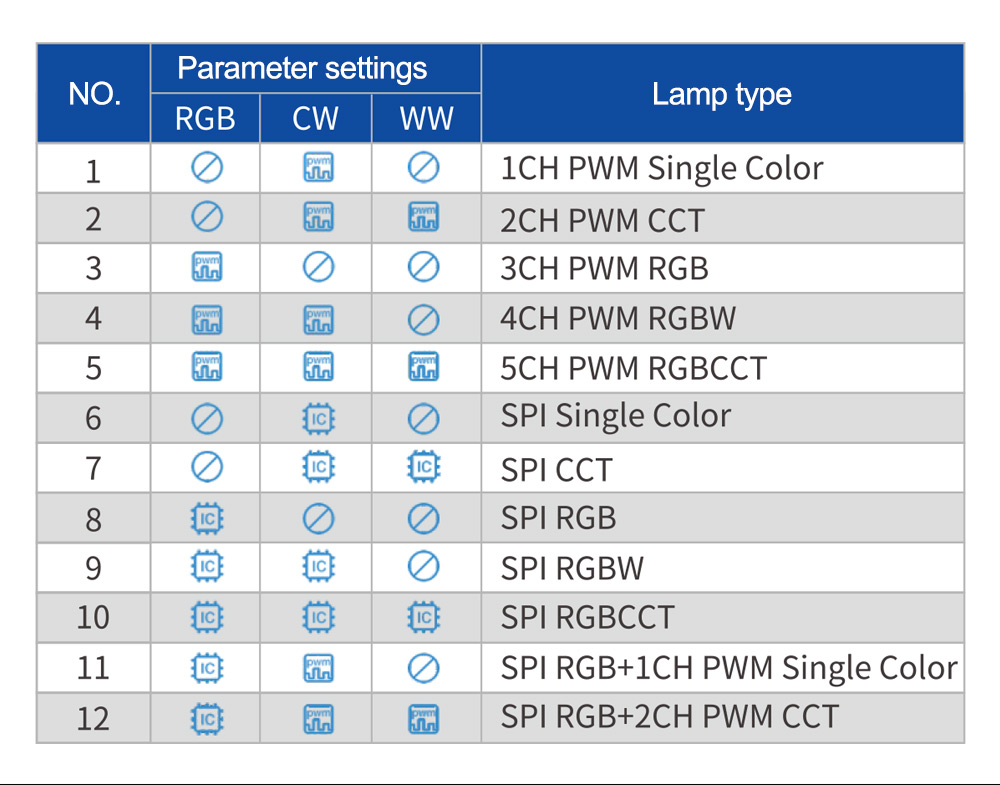
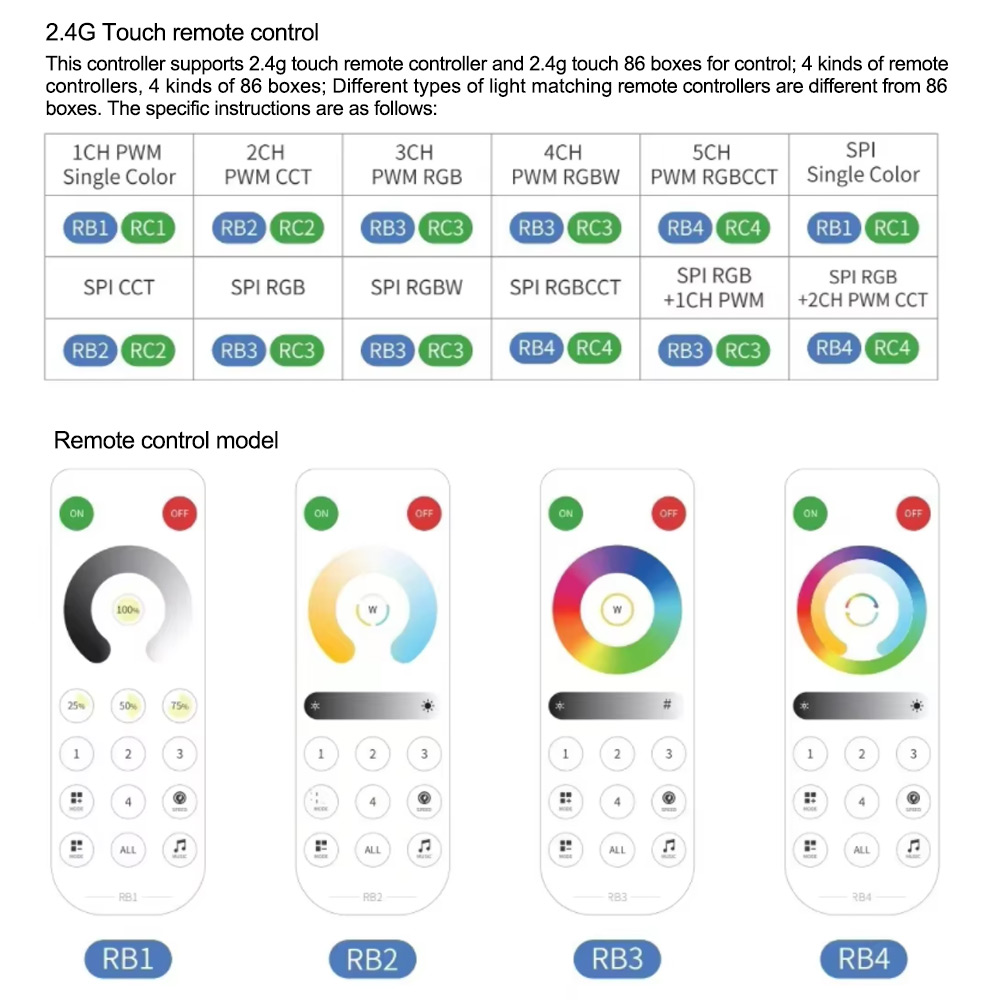
Function | CCT/RGB/RGBW/RGBCCT Control |
Frequency | 2.4G |
Programmable LED Controller
Take full control of your lighting with a versatile controller for LED strip lights that lets you customize brightness, colors, and effects with ease. Manage your setup anywhere using a user-friendly LED controller app for seamless operation. Enjoy vibrant colors and dynamic effects through RGB LED strip lighting with remote control, perfect for any mood or occasion. Create stunning light shows effortlessly with the innovative magic LED controller. Control multiple devices from one platform using the universal LED remote control app for maximum convenience. For tech enthusiasts, Arduino LED control offers limitless programming possibilities, while our high-performance controller for LED strip lights ensures reliable performance. With advanced features and flexibility, this controller for LED strip lights is ideal for both home and commercial use, and our professional-grade controller for LED strip lights guarantees long-lasting satisfaction.
RGB LED Strip Light Controller
Upgrade your lighting setup with a smart controller for LED strip lights that delivers precise brightness and color adjustments. For simple single-color or dual-channel setups, the 2 pin RGB LED controller offers easy connection and reliable performance. Bring your projects to life with the LED pixel light controller, enabling stunning animations and custom effects. Sync your lighting to the beat using the dynamic RGB LED music controller for immersive experiences. Manage your lighting from anywhere with intuitive apps to control LED lights, ensuring total convenience. Designed for durability and flexibility, this professional controller for LED strip lights ensures consistent performance, making it the ideal controller for LED strip lights for both home décor and commercial applications. With cutting-edge features, our advanced controller for LED strip lights is the perfect choice for creative lighting control.
Controller for LED Strip Lights FAQ
How do I wire an LED controller?
To wire an LED controller, first turn off the power supply to avoid damage or injury. Connect the power supply’s positive (+) and negative (–) wires to the controller’s input terminals (marked V+ and V–). Then, connect the controller’s output terminals to your LED strip, matching polarity and color channels — for example, + to +, R to R, G to G, B to B, and W to W if your strip has white LEDs. Once all wiring is secure, restore power and use the controller’s remote or app to adjust colors, brightness, and effects. Always use a controller with the same voltage rating as your LED lights.
How to connect led controller to led lights?
Start by turning off the power supply. Connect the power supply’s positive (+) and negative (–) wires to the input terminals of the controller for LED strip lights (V+ and V–). Next, connect the output terminals of the controller to your LED lights, making sure the polarity and channels match — for RGB strips, connect + to +, R to R, G to G, and B to B; for RGBW strips, also connect the W channel. Once all connections are tight and secure, turn the power back on and use the remote or app to control your lights. Always ensure the controller’s voltage matches your LED lights.


/5